UX/UI Design
Giving Teachers Visibility Into Their Messages
Sending a message was easy. Knowing what happened next — wasn't.
Year :
2025
Industry :
SaaS
Client :
Schoolvoice
Role :
Lead UX/UI Designer
The Problem:
"Teachers were sending into the void"
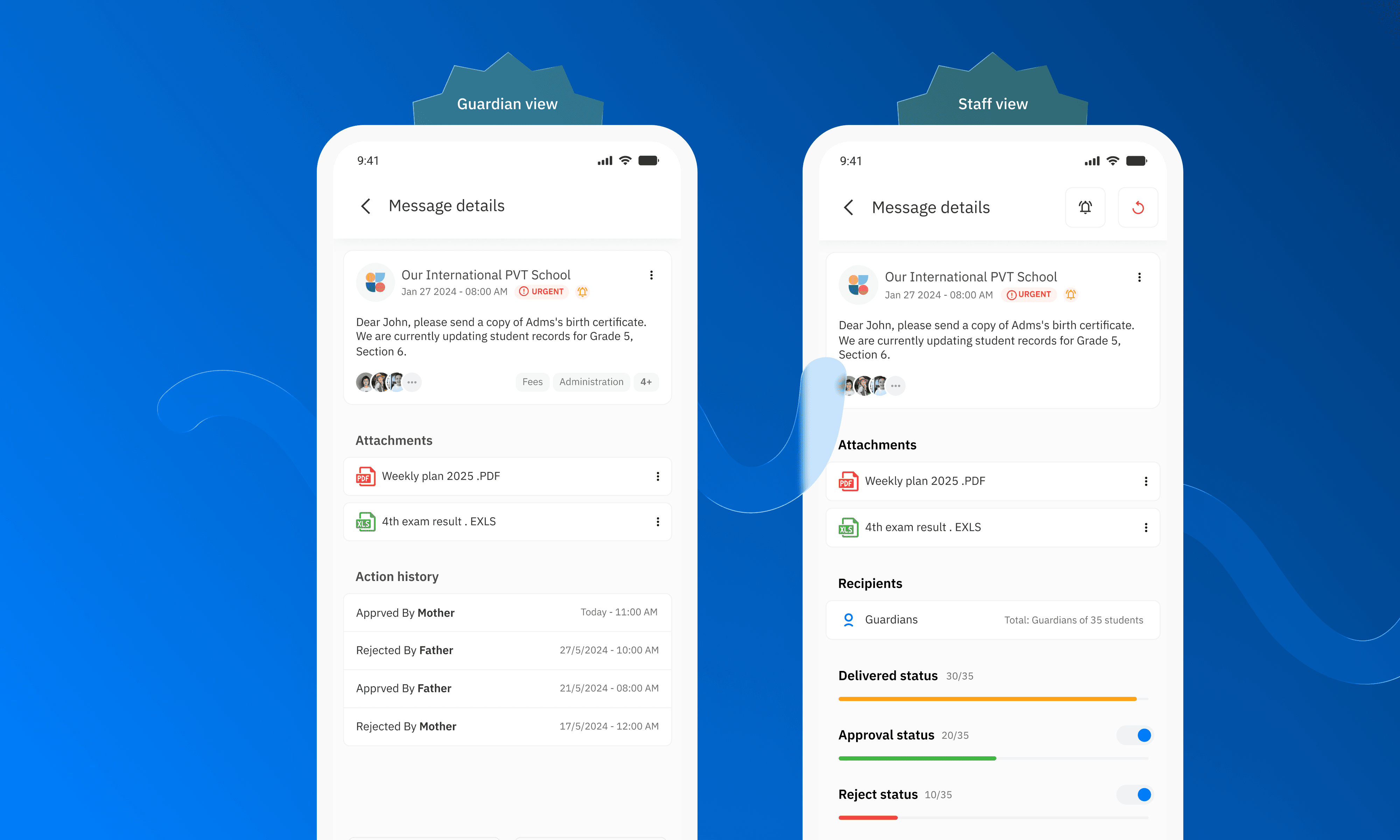
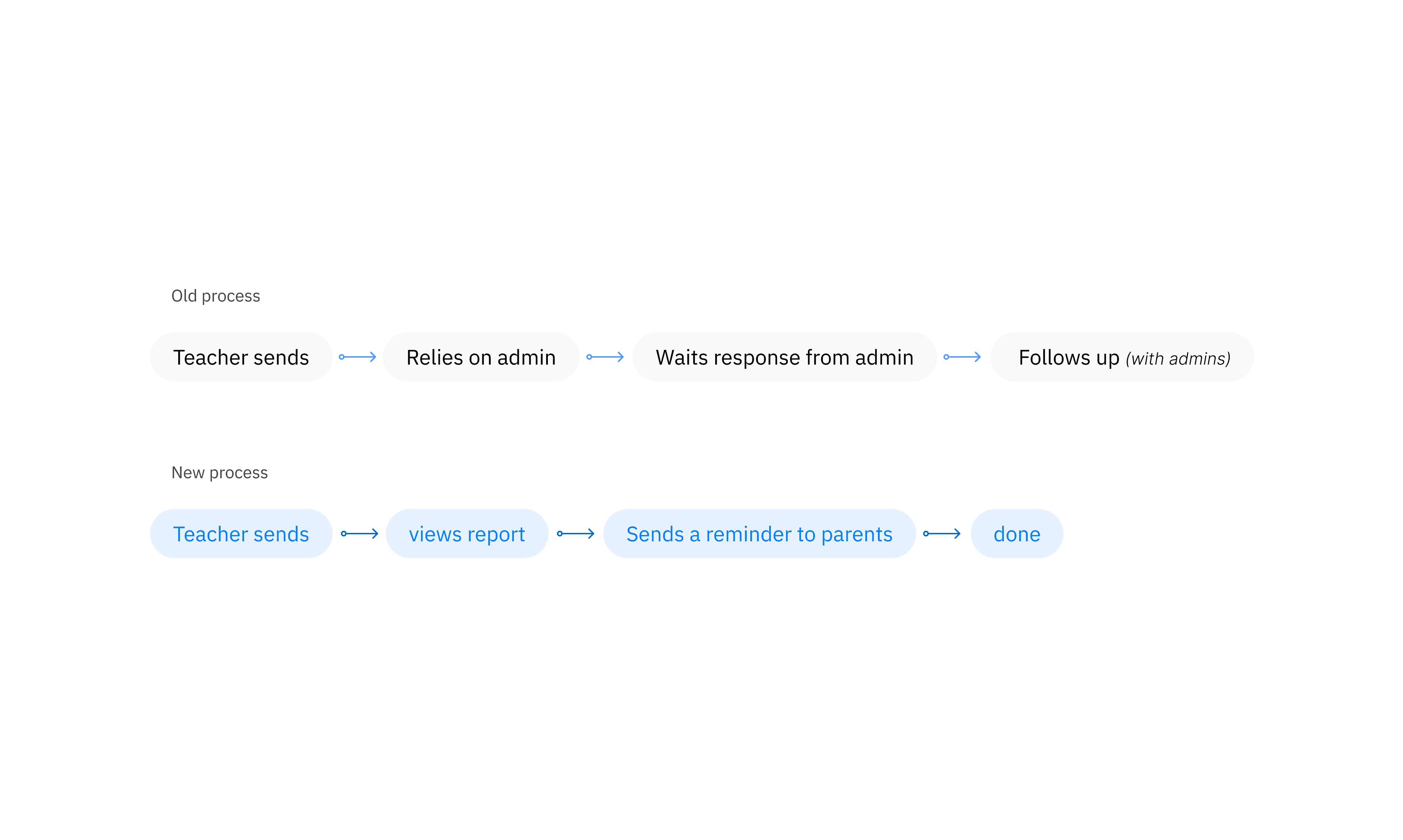
Schoolvoice operates at scale — 430+ schools, 24,000+ staff members, and over 400,000 parents across its network. At that volume, a message that goes unread or unanswered isn't a minor inconvenience. It's a gap in the communication infrastructure that schools depend on. Yet teachers had no way to know what happened after they hit send. Delivery status, read receipts, and action completions — none of this was visible at the teacher level. The only feedback loop available was indirect: a parent might reply via private chat, or a response might surface in the replies thread. For everything else, teachers were operating blind. Reports existed — but they were locked inside the admin panel, accessible only to school administration. The teacher closest to the communication, the one who sent the message and needed to follow up, had no access to the data that would tell them whether their message had landed. The result was a hidden dependency: teachers leaning on administrators to pull reports, administrators fielding requests that shouldn't have reached them, and follow-up happening late — if at all.
Reports for Teachers:
"Two report types. One clear picture."
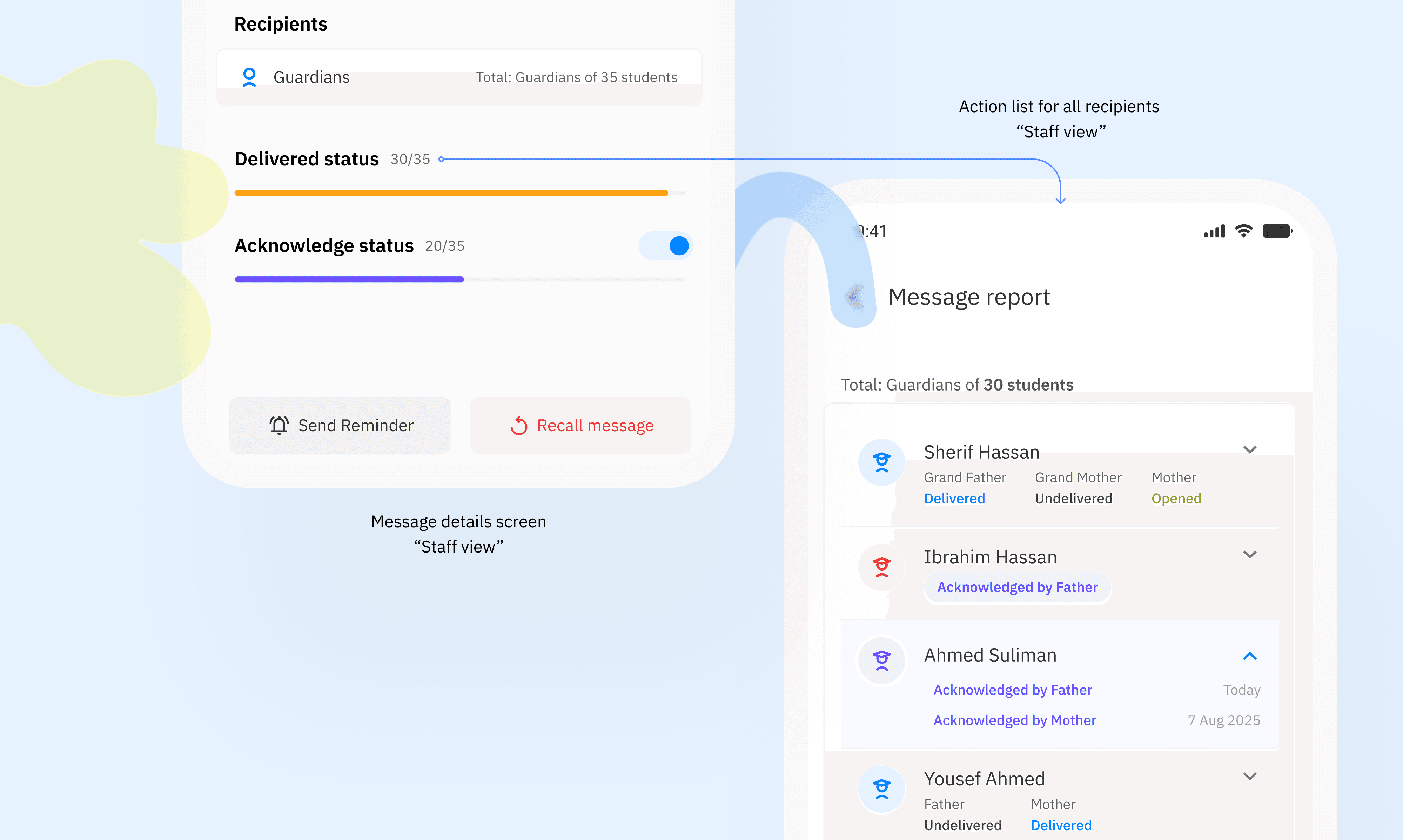
The core of the solution was bringing report visibility directly into the teacher's interface—structured around two distinct states that answer different questions. Delivery Status answers: Did the message reach them? Teachers can see at a glance how many parents received the message and how many haven't been reached yet. For time-sensitive communications, this is the first signal that determines whether a follow-up is needed. Action Status answers: Did they take action on it? For messages that require a response—an approval request, an acknowledgment, or an absence reason—teachers can track who has completed the required action and who hasn't. The separation matters. A parent can receive a message without acting on it. Conflating delivery with engagement was one reason follow-up was so imprecise before. Splitting them into two explicit states gives teachers the granularity to make better decisions — and a direct path to send a reminder to only those who haven't responded, without manually cross-referencing lists.
Action History:
"Two parents. One message. Full transparency between them."
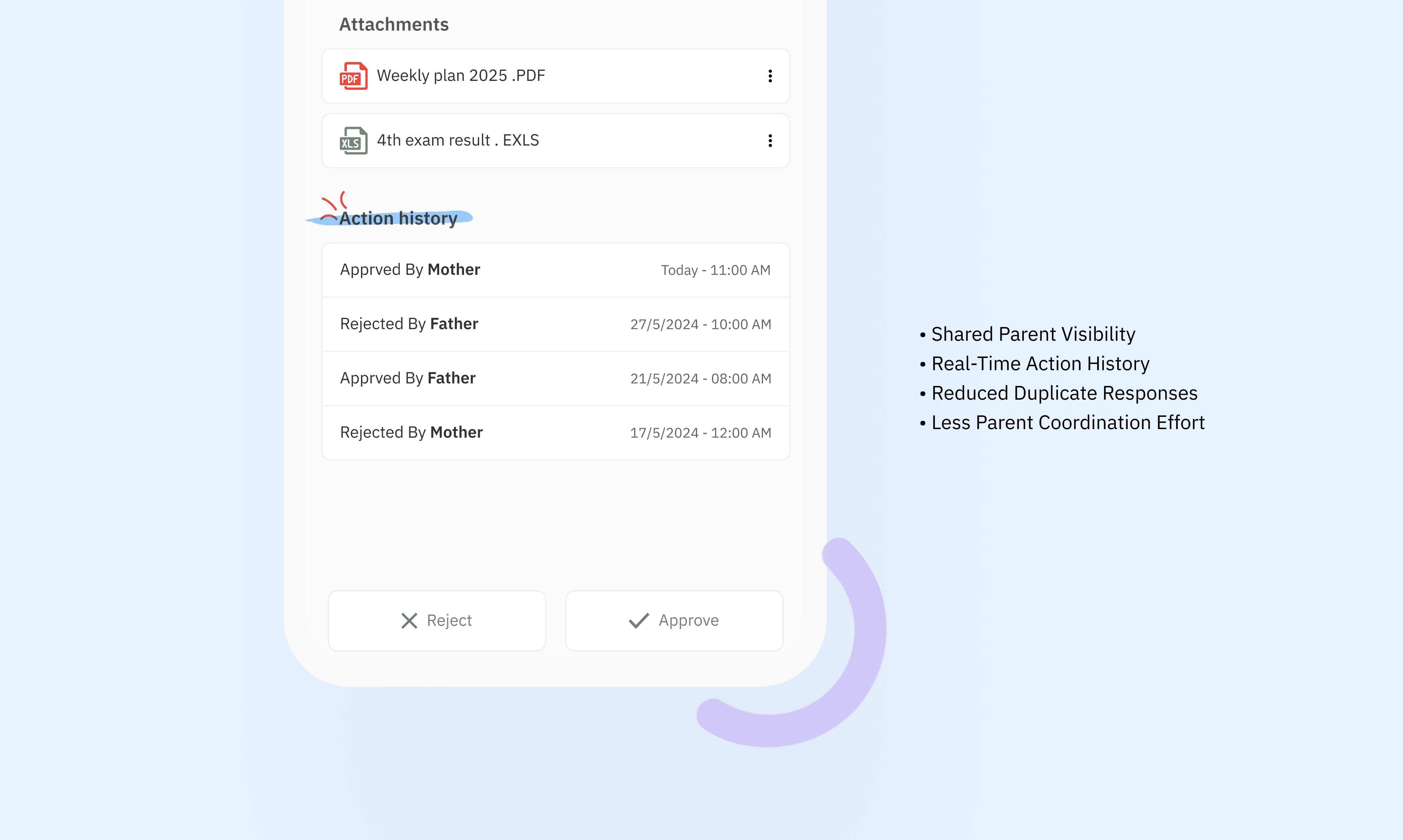
Messages in Schoolvoice often reach both parents simultaneously — and what one parent does with a message affects the other. Before this feature, each parent acted in isolation, with no visibility into whether their partner had already responded. The Action History surface inside the message detail view gives each parent a timestamped record of interactions on that message — their own actions and those of their co-parent. If the mother confirms attendance, the father sees it. If one parent has already signed a form, the other doesn't need to follow up. This wasn't just a convenience feature. It reduced duplicate responses, eliminated the "did you handle this?" coordination that previously happened outside the app, and gave both parents confidence that the communication was being managed — without requiring them to talk to each other first.
The Outcome:
"Visibility that removed an entire coordination layer"
By giving teachers direct access to delivery and action reports, the design eliminated a bottleneck that had been built into the workflow from the start. Teachers no longer needed to route report requests through administration. Administrators were freed from a class of requests that shouldn't have required their involvement. For a network of 430+ schools and 24,000+ staff, reducing that coordination overhead compounds quickly. A teacher who can identify unresponsive parents and trigger a targeted reminder — without waiting for a report to be pulled — is a teacher who follows up faster and more precisely. The Action History feature extended the same principle to the parent side: less coordination friction, more confidence that the right people have seen and acted on what matters. At 400,000+ parents, even marginal improvements in response rates and follow-up precision represent a meaningful shift in how effectively schools communicate with families.
More Projects


UX/UI Design
Giving Teachers Visibility Into Their Messages
Sending a message was easy. Knowing what happened next — wasn't.
Year :
2025
Industry :
SaaS
Client :
Schoolvoice
Role :
Lead UX/UI Designer
The Problem:
"Teachers were sending into the void"
Schoolvoice operates at scale — 430+ schools, 24,000+ staff members, and over 400,000 parents across its network. At that volume, a message that goes unread or unanswered isn't a minor inconvenience. It's a gap in the communication infrastructure that schools depend on. Yet teachers had no way to know what happened after they hit send. Delivery status, read receipts, and action completions — none of this was visible at the teacher level. The only feedback loop available was indirect: a parent might reply via private chat, or a response might surface in the replies thread. For everything else, teachers were operating blind. Reports existed — but they were locked inside the admin panel, accessible only to school administration. The teacher closest to the communication, the one who sent the message and needed to follow up, had no access to the data that would tell them whether their message had landed. The result was a hidden dependency: teachers leaning on administrators to pull reports, administrators fielding requests that shouldn't have reached them, and follow-up happening late — if at all.
Reports for Teachers:
"Two report types. One clear picture."
The core of the solution was bringing report visibility directly into the teacher's interface—structured around two distinct states that answer different questions. Delivery Status answers: Did the message reach them? Teachers can see at a glance how many parents received the message and how many haven't been reached yet. For time-sensitive communications, this is the first signal that determines whether a follow-up is needed. Action Status answers: Did they take action on it? For messages that require a response—an approval request, an acknowledgment, or an absence reason—teachers can track who has completed the required action and who hasn't. The separation matters. A parent can receive a message without acting on it. Conflating delivery with engagement was one reason follow-up was so imprecise before. Splitting them into two explicit states gives teachers the granularity to make better decisions — and a direct path to send a reminder to only those who haven't responded, without manually cross-referencing lists.
Action History:
"Two parents. One message. Full transparency between them."
Messages in Schoolvoice often reach both parents simultaneously — and what one parent does with a message affects the other. Before this feature, each parent acted in isolation, with no visibility into whether their partner had already responded. The Action History surface inside the message detail view gives each parent a timestamped record of interactions on that message — their own actions and those of their co-parent. If the mother confirms attendance, the father sees it. If one parent has already signed a form, the other doesn't need to follow up. This wasn't just a convenience feature. It reduced duplicate responses, eliminated the "did you handle this?" coordination that previously happened outside the app, and gave both parents confidence that the communication was being managed — without requiring them to talk to each other first.
The Outcome:
"Visibility that removed an entire coordination layer"
By giving teachers direct access to delivery and action reports, the design eliminated a bottleneck that had been built into the workflow from the start. Teachers no longer needed to route report requests through administration. Administrators were freed from a class of requests that shouldn't have required their involvement. For a network of 430+ schools and 24,000+ staff, reducing that coordination overhead compounds quickly. A teacher who can identify unresponsive parents and trigger a targeted reminder — without waiting for a report to be pulled — is a teacher who follows up faster and more precisely. The Action History feature extended the same principle to the parent side: less coordination friction, more confidence that the right people have seen and acted on what matters. At 400,000+ parents, even marginal improvements in response rates and follow-up precision represent a meaningful shift in how effectively schools communicate with families.
More Projects
UX/UI Design
Giving Teachers Visibility Into Their Messages
Sending a message was easy. Knowing what happened next — wasn't.
Year :
2025
Industry :
SaaS
Client :
Schoolvoice
Role :
Lead UX/UI Designer
The Problem:
"Teachers were sending into the void"
Schoolvoice operates at scale — 430+ schools, 24,000+ staff members, and over 400,000 parents across its network. At that volume, a message that goes unread or unanswered isn't a minor inconvenience. It's a gap in the communication infrastructure that schools depend on. Yet teachers had no way to know what happened after they hit send. Delivery status, read receipts, and action completions — none of this was visible at the teacher level. The only feedback loop available was indirect: a parent might reply via private chat, or a response might surface in the replies thread. For everything else, teachers were operating blind. Reports existed — but they were locked inside the admin panel, accessible only to school administration. The teacher closest to the communication, the one who sent the message and needed to follow up, had no access to the data that would tell them whether their message had landed. The result was a hidden dependency: teachers leaning on administrators to pull reports, administrators fielding requests that shouldn't have reached them, and follow-up happening late — if at all.
Reports for Teachers:
"Two report types. One clear picture."
The core of the solution was bringing report visibility directly into the teacher's interface—structured around two distinct states that answer different questions. Delivery Status answers: Did the message reach them? Teachers can see at a glance how many parents received the message and how many haven't been reached yet. For time-sensitive communications, this is the first signal that determines whether a follow-up is needed. Action Status answers: Did they take action on it? For messages that require a response—an approval request, an acknowledgment, or an absence reason—teachers can track who has completed the required action and who hasn't. The separation matters. A parent can receive a message without acting on it. Conflating delivery with engagement was one reason follow-up was so imprecise before. Splitting them into two explicit states gives teachers the granularity to make better decisions — and a direct path to send a reminder to only those who haven't responded, without manually cross-referencing lists.
Action History:
"Two parents. One message. Full transparency between them."
Messages in Schoolvoice often reach both parents simultaneously — and what one parent does with a message affects the other. Before this feature, each parent acted in isolation, with no visibility into whether their partner had already responded. The Action History surface inside the message detail view gives each parent a timestamped record of interactions on that message — their own actions and those of their co-parent. If the mother confirms attendance, the father sees it. If one parent has already signed a form, the other doesn't need to follow up. This wasn't just a convenience feature. It reduced duplicate responses, eliminated the "did you handle this?" coordination that previously happened outside the app, and gave both parents confidence that the communication was being managed — without requiring them to talk to each other first.
The Outcome:
"Visibility that removed an entire coordination layer"
By giving teachers direct access to delivery and action reports, the design eliminated a bottleneck that had been built into the workflow from the start. Teachers no longer needed to route report requests through administration. Administrators were freed from a class of requests that shouldn't have required their involvement. For a network of 430+ schools and 24,000+ staff, reducing that coordination overhead compounds quickly. A teacher who can identify unresponsive parents and trigger a targeted reminder — without waiting for a report to be pulled — is a teacher who follows up faster and more precisely. The Action History feature extended the same principle to the parent side: less coordination friction, more confidence that the right people have seen and acted on what matters. At 400,000+ parents, even marginal improvements in response rates and follow-up precision represent a meaningful shift in how effectively schools communicate with families.